dsh-todo-bar
A todo bar that floats over the interface. You do not open it — it is already there. Drag it anywhere, double-click to reset, collapse it to a single line when it is in the way.
Every other todo plugin in this ecosystem asks you to click a sidebar icon first. That is one decision too many when the point is to remember something.
This one lives in the overlay layer. Open any session, it is on screen. Drag it to a corner you are not using, and it stays there across restarts.
What it shows
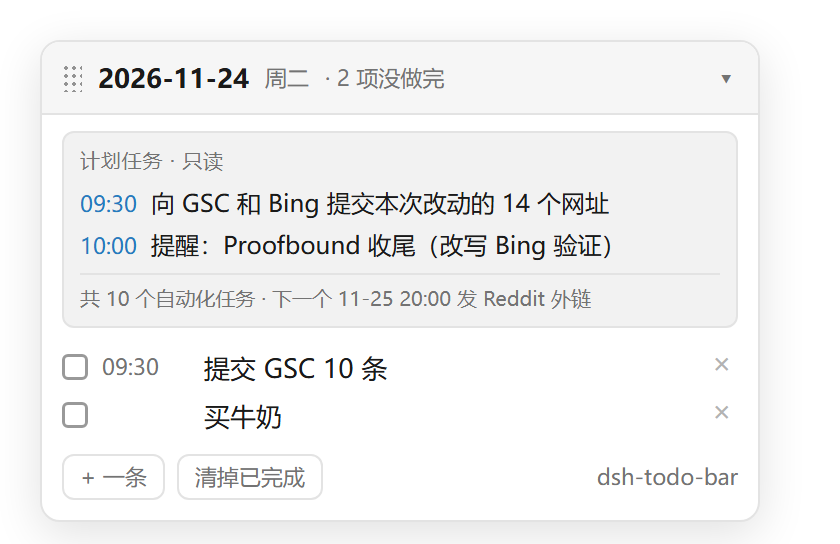
Three things, in one 360px card: today's date and weekday, how many manual items are still open, and the scheduled tasks the host has queued for today.
Scheduled tasks sit in the same card as your own list — no other plugin in this ecosystem does that. They are read-only: they belong to the scheduler, and the bar only shows what today is already committed to, so you stop double-booking yourself.
Adding an item takes one line
There is no separate time field. Write the clock time at the start and it is pulled out:
09:30 and 9:30 both work, so does the Chinese colon 9:30. A single-digit hour is normalized to two digits so sorting stays correct.
Times that cannot exist are not treated as times. 10:99 and 25:00 stay in the body text where you can see them, instead of silently corrupting the sort order.
09:30 提交 GSC 10 条
8:00出去玩
买牛奶
Finishing something removes it
Tick the box and the row disappears after 0.9 seconds. Scheduled tasks behave the same way — they leave the list once they run. A list that keeps its finished rows turns into an archive nobody reads.
Crossing midnight
At local midnight the whole of yesterday moves into an archive (last 30 days kept on disk), and only the unfinished items are carried into the new day, tagged with the date they came from.
Finished items do not follow you forward. Yesterday is yesterday.
The model can read and write it
A daily_brief tool is registered against the same file the bar renders, so the two can never disagree.
Ask the agent to add something and it lands on the bar. Ask what is left and it reads the same list you are looking at.
ops: list / add / toggle / edit / remove / clearDoneWhere the data lives
$DSH_HOME/dsh-todo-bar/state.json, default ~/.dsh/dsh-todo-bar/state.json.
One file, shared by every profile and every browser pointed at this host. Writes go through a temporary file and a rename, so a crash mid-write cannot leave a half-written document. A damaged file is renamed to state.json.corrupt-<timestamp>.bak and replaced with an empty day.
Privacy
Nothing leaves the machine. No account, no network call, no telemetry. Scheduling data is read from the host's own store and never written back.
Install
Then restart the host once — the route and the client bundle register at startup. It is also on npm and GitHub if you would rather read the source first.
dsh plugin --profile web add dsh-todo-barRequirements
DeepSeek Harness >= 0.2.0-rc.1 for the shell.overlay slot and ctx.webServer. A Web profile is required: CLI-only profiles have no web server, so the browser half has nothing to render into.
No platform code. Windows, macOS and Linux run the same file; the interface language follows whatever DSH is set to.
The Desktop client is untested. The slot tree is probably the same, but "probably" is not "verified", so it is not claimed.
What it deliberately does not do
No reminders — DSH already schedules work, and a second reminder system would fight it.
No categories, no Gantt charts, no time tracking, no Markdown view. Those exist in other plugins and this one is not trying to replace them.
No history browser. The archive keeps 30 days on disk, but the bar does not render past days: reading old lists is a different job from remembering today.
Common questions
Where is it on screen after install?
Bottom-right of the window, floating above the interface. If you do not see it, the client bundle is cached — force reload the page with Ctrl+Shift+R.
Can I move it somewhere less annoying?
Yes. Drag the title bar anywhere on screen; the position is saved and restored on the next load. Double-click the title bar to send it back to the corner.
Why do I only see some of my scheduled tasks?
Only today's are listed, because a list of ten future tasks buries what you have to do now. The footer tells you the total and when the next one fires.
Does it work if I use several browsers?
Yes for the data — it lives on the host, so every browser sees the same list. The window position is per browser, stored where that browser can read it.
What happens to my list if I switch language?
Nothing. The interface text changes, the data does not. Language follows the DSH setting; the plugin does not keep its own language preference.