Carry a session to the other machine
v0.1.5 · Windows and macOS
A session file is not portable on its own. Its first line records an absolute cwd, and DSH derives both the folder it must live in and the workspace it belongs to from that one string. Copy the file without changing it and the session either fails the identity check or lands outside every workspace. This tool rewrites that single field, moves the file to the matching folder, copies the attachments it references, and adds the id to the workspace that owns that path.
First run
Four steps, once per machine. After that it is two commands.
1Prepare the mailbox
A private git repository both machines can push to; session bytes never go anywhere else. A synced folder works too — the tool only cares about the directory layout.
git clone <your-private-repo> ~/.dsh/handoff2Install
Node.js 22.15 or newer, plus git. No other dependencies.
npm i -g @mrwilliam/dsh-handoff
dsh-handoff status3Say which machine this is
The device name becomes part of the ticket path, so the two machines must differ. The port is what the tool probes before writing anything.
dsh-handoff config --device my-mac --mailbox ~/.dsh/handoff --port 2081 --restart manual4Map the other folder onto this one
Longest prefix wins and the prefix must stop on a path boundary. With no matching entry the import stops at exit 2 instead of guessing. Paths go in full; in JSON a backslash is written twice.
dsh-handoff config --map ./map.json

# map.json
echo '{"cwdMap":[{"from":"<source cwd>","to":"<local path>"}]}' > map.json
Three commands and one click
sendSend one session
Mark a ticket inside the mailbox repository. The session file is copied byte for byte — the header is not touched on this side, so the original keeps its hash.
node bin/dsh-handoff.mjs send --ids session-6d75550c
git pushreceiveReceive on the other machine
The header cwd is rewritten against your mapping table, the file lands under the folder that path implies, attachments are copied by sha256, and the workspace index gets the id. When this machine is running DSH, a one-shot scheduled task stops it, imports, starts it again and checks the port — about fifteen seconds.
node bin/dsh-handoff.mjs inbox
node bin/dsh-handoff.mjs receive <ticket> --yesconflictTwo machines, same session
Judged by frames, not timestamps: whoever is a byte prefix of the other is the older copy. A real divergence keeps your local file untouched and stores the incoming one beside it — nothing is merged, nothing is overwritten.
node bin/dsh-handoff.mjs plan <ticket>Three places in the interface
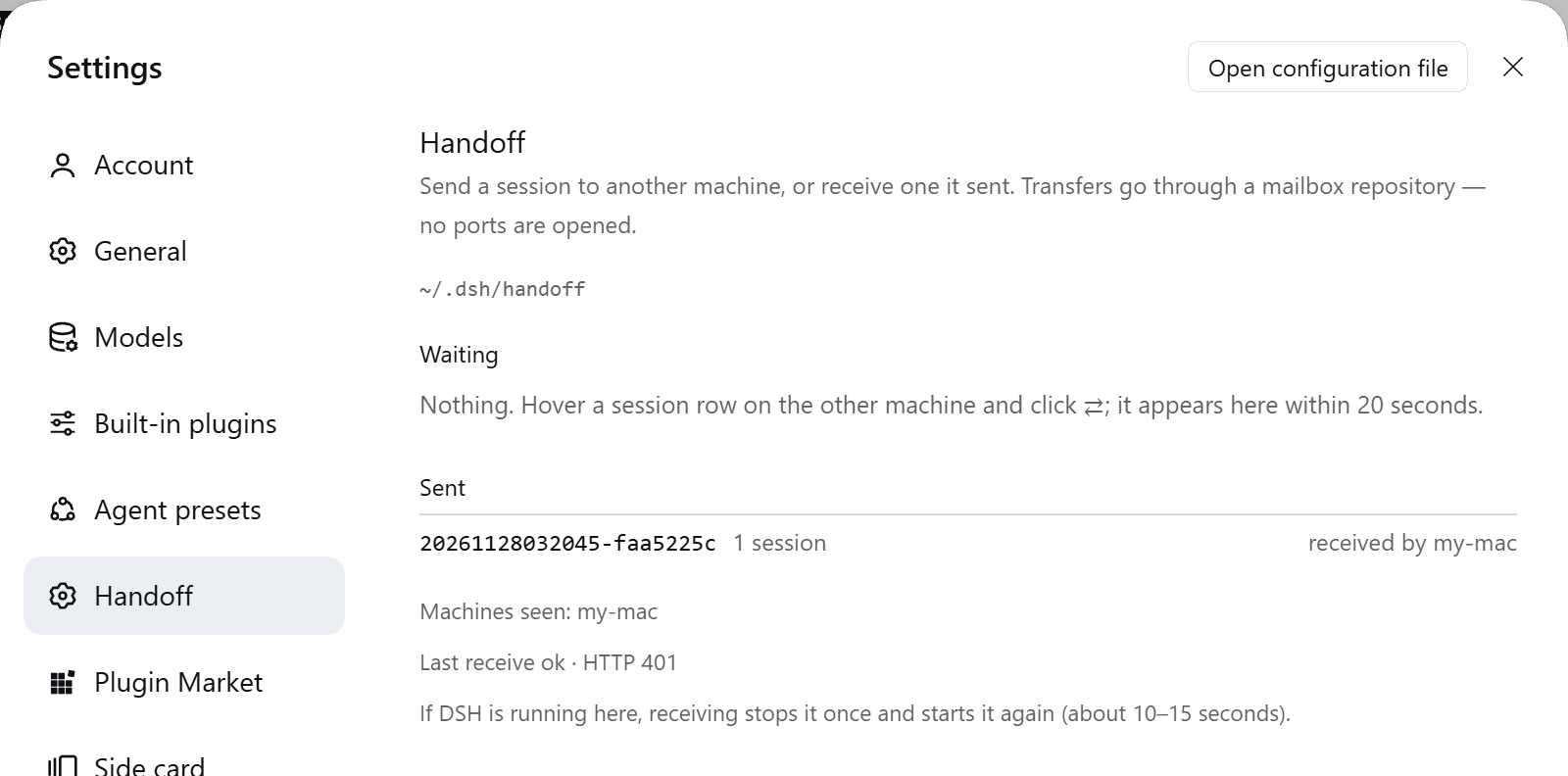
The plugin adds a settings page, a badge in the sidebar foot, and one button at the end of each session row. Nothing else changes.
- Settings then Handoff — Always there: mailbox path, waiting tickets, sent tickets with their receipts, last result.
- Sidebar foot badge — Only when there is something to do — a waiting ticket, a failed receive, or a fresh one for ten minutes.
- The session row arrow — Hover a session and click it. That session goes into the mailbox.
What moves through it
sessions/<projectKey>/<id>/session.v4.jsonl.zstd- the cwd inside the first frame (only this field)
attachments/v1/<sha256>- the sessionIds in the workspace index
Body frames move byte for byte.
Never touched
.credentials.yamlprofiles/skills/storages/schedule.json- other sessions, other project folders
Not read, not hashed, not uploaded.
Both machines changed the same session
Decided by bytes, not by time. If your copy is a prefix of the incoming one, yours is older and gets replaced. If neither is a prefix they diverged: your file is left untouched and the incoming copy lands beside it as session.<id>.incoming-<stamp>. Keeping both is deliberate — the tool cannot know which branch you meant to keep.
What it will not do
- It does not merge two divergent session files. Both are kept; picking one is your call.
- It does not sync whole accounts: profiles, skills, scheduled tasks and credentials stay where they are.
- It does not write while DSH is up, because the workspace index is one JSON file the host keeps in memory. The receive path stops the service first.
- It does not create workspaces. If no workspace owns the target path, the id is left out and the session shows up ungrouped.
Platforms
| Platform | Capability |
|---|---|
| Windows | Full path: stop on receive, import, start again, verify the port. |
| macOS | Import works; stopping and starting DSH is manual, the restart helper is Windows only. |
| Both | Session format v4. Keep the two installs on the same minor version; a much older engine refuses a newer log. |
What was actually verified
- A 511-frame session went from macOS to Windows: the header cwd was rewritten to the mapped path on the receiving machine, 1 attachment was copied, the workspace index grew by one, and DSH own session list reported it as current with its original title.
- The same in reverse: a 16-frame session went from Windows to macOS, and its two turns were readable after the import.
- Both directions left receipts: each side wrote .receipt-<device>.json and the sender saw "received by" in its own inbox.
- Sending never changes the source file: its sha256 matched the exported manifest after the transfer.
Get it
Single file, no dependencies beyond Node.js 22.15 and git. The mailbox is a private git repository you own — session bytes never leave your machines for anyone else.
npm i -g @mrwilliam/dsh-handoff
dsh-handoff status
No global install wanted? Take the zip from the mailbox repository and run it in place.
Source and changelog on GitHub
When something goes wrong
- Receive exits 4 — The tool found signs that DSH is in use. Stop it properly. Only when you are certain it is stopped and the probe is wrong, --i-stopped-dsh skips the check.
- The mapping reports no matching entry — The source cwd is not under any mapped prefix. Add one, and keep the prefix on a path boundary.
- A ticket never appears — The mailbox is a git repository: pull it. inbox and receive do that for you; a folder copied by hand needs the sender to push.
- The session lands ungrouped — No workspace on this machine owns that path. Open that folder in the app once, or add the id to storages/workspace.json and keep a backup.
Removing it
Uninstalling the command line leaves the mailbox and the imported sessions alone. The plugin is a single directory inside the profile.
npm rm -g @mrwilliam/dsh-handoff
dash plugin --profile web remove dsh-handoff-panel
Requirements and licence
Node.js 22.15 or newer and git on both machines. Session format v4. MIT licensed; the source is one directory in the Skills repository.
Install it with one prompt
A command line tool that writes inside ~/.dsh. Before installing, know what it touches: the header cwd, attachments, and the workspace index.
Paste this into DSH, or send it to a colleague:
Install Handoff on this machine and verify it: https://www.dshtoolbox.com/tools/handoff/
1. Check this machine has Node.js 22.15 or newer, and git
2. Install the command line: `npm i -g @mrwilliam/dsh-handoff`
3. Tell it which machine this is: `dsh-handoff config --device <this machine> --mailbox <mailbox repo path> --port <local DSH port> --restart manual`
4. Add the path mapping: the other machine folder onto a local one (absolute paths; a backslash in JSON is written twice)
5. Run `dsh-handoff status` and confirm it lists the local sessions with zero inconsistent paths
Paste back the `status` output and the `config` result. If a step fails, stop and paste the error instead of adding flags to get past it. To upgrade later: `npm i -g @mrwilliam/dsh-handoff@latest`, then run status again.