dsh-prompt-pocket
A pocket, not a library. One 24px dot, save with one keystroke, insert at the caret, and a generator that turns a rough note into a DSH prompt.
Nothing new appears in the layout. No sidebar entry, no chip row above the composer, no panel that shifts the conversation. The dot floats, and it drags.
Saving never opens a dialog. Press Ctrl+Shift+S and the draft you were already typing is kept — no copy, no paste, no title, no tags.
What it looks like
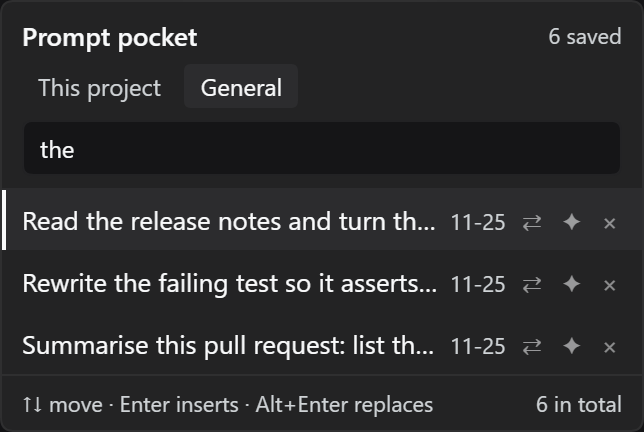
A 320px card: one search box, two drawers, one line per prompt, and a 24px dot you can drop anywhere on screen. The dot does not take part in layout — it sits in a fixed overlay, so opening it never reflows the conversation.
Save in one keystroke
Ctrl+Shift+S saves the selection if you have one, the whole draft if you do not. Neither path opens anything, so you keep typing after it.
A two-second line beside the dot confirms where it landed and offers to move it. The confirmation appears even while the panel is closed — the moment you need it is the moment you are not looking at the panel.
The drawer it saves to is the one you last picked, falling back to this project. You are not asked each time.
Two drawers, split by workspace
This project: every session in the same workspace sees it. Paths, client names and half-written context belong here.
General: visible everywhere.
The split follows the workspace, not the session. Sessions get archived and forked; a prompt pinned to one session loses its home the moment that session moves. A bare session with no workspace falls back to General instead of showing an empty drawer.
Opening a drawer that holds nothing switches to the one that does, once. After that the tab you click wins, and the header counts the drawer you are looking at.
Insert at the caret, not into the draft
Enter inserts at the caret in one undo step. It goes through the composer’s revision-guarded insert, so the quote chip or attachment you already had stays exactly where it is. Alt+Enter replaces the whole draft instead.
Focus goes back to the composer afterwards. The panel closes itself, so the next keystroke lands in your message, not in a lost overlay.
↑ ↓ walk the list with wrap-around, Esc closes. A one-row drawer still shows a left accent so you can see what is selected.
Each row is one line, 60 characters, with the lead-in (Goal:, Task:) stripped; hovering shows the first 300 characters, which is usually enough to tell two prompts apart without opening either.
Turn a note into a DSH prompt
This is a generator, not a paraphraser. The ✦ button on a row, or the button on the save confirmation, asks the current default model for a prompt written for DSH: the goal in one line, the context and paths you mentioned, ordered steps or constraints, and the shape of the answer you expect.
Your {{variables}}, paths, URLs and code blocks are kept byte-for-byte, and nothing you did not state gets invented — no tools, files, numbers or requirements. Generic filler (“be careful”, “ensure quality”) is forbidden by the instruction.
You get the original and the result side by side: use this one, discard, or try again. Accepting keeps the old text in prior, so one click gets it back. A failed, empty or runaway result never replaces anything; a result over 8,000 characters is refused rather than stored.
If the note is already an executable prompt, it comes back unchanged and the panel says so instead of pretending to work.
Save a reply as a prompt
Every assistant reply carries a ⤓ action. One click stores that reply’s Markdown verbatim, labelled as source material, so the ✦ generator is deliberately not offered on it — you kept it verbatim on purpose.
The action row only knows a message id, so the text comes from a host route that reads the session log. Only text blocks are taken; tool calls are skipped, never stringified into the prompt.
The agent can use the same pocket
A prompt_stash tool reads and writes the same file the panel renders: list, search, save, remove. Say “save that as a prompt” and it lands in the pocket without a copy-paste.
The tool respects the drawers. Asked without a workspace it sees General only, so one project’s prompts never leak into another project’s answer.
Where the data lives
$DSH_HOME/dsh-prompt-pocket/store.json, by default ~/.dsh/dsh-prompt-pocket/store.json. One file for every profile and every browser pointed at this host.
Writes go through a temporary file and a rename. A damaged file is renamed to .corrupt-<timestamp>.bak and replaced with an empty pocket, so corruption never blocks the panel.
500 prompts maximum; when it is full the least recently used one goes. No dialog, no archive of things you never open again.
Privacy and footprint
Nothing leaves the machine except the one model call you explicitly ask for. No account, no telemetry, no network request on save or on open.
The generator runs on your current default model through the harness itself — no separate key to configure. With no model configured it answers 503 instead of inventing a result.
The client bundle is plain JavaScript with no runtime dependencies.
Install
Restart the host once — the route, the tool and the client bundle all register at startup. Then force-reload the page with Ctrl+Shift+R; the client bundle is cached hard.
dsh plugin --profile web add dsh-prompt-pocketRequirements
DeepSeek Harness >= 0.2.0-rc.1 and a Web profile: the pocket renders inside the composer and needs the conversation slots plus a web server.
Windows, macOS and Linux run the same file. The interface language follows the DSH setting.
The Desktop client is untested. The slot tree is probably the same, and “probably” is not verified, so it is not claimed.
What it deliberately does not do
No tags, folders, import wizard or recycle bin. Each one needs a panel, and a panel needs a decision every time you save; this tool exists so there is nothing to decide.
No rewriting on save. Text stays exactly as you typed it until you press ✦.
No cloud sync. One file on this host; moving machines means copying that file.
Common questions
Where is it on screen?
Bottom-right by default, as a very faint dot. Drag it anywhere; the position is remembered per browser. Double-click is not wired — dragging is the move.
Why does it save to “this project” by default?
Because a prompt with paths and client names is worthless elsewhere. The save confirmation offers a one-click move to General, and the next save follows the drawer you last picked.
Does the generator change my prompt without asking?
No. It only runs when you click ✦ or the button on the save confirmation, and the result waits in a side-by-side view until you accept it.
What happens when I hit 500?
The least recently used prompt is dropped to make room. Nothing is archived, nothing asks you first.
Can two browsers share the list?
Yes for the data — it lives on the host. Window position is per browser, stored locally.